
Magnetic Power Strips and Compact Alternatives for Tight Spaces
Last updated By Maya Bennett How we chooseAffiliate disclosure

Start with the location that needs power, not the port count on the box. Mark where the device and its widest adapters would sit, then open nearby doors and drawers and move the furniture through its normal range. Trace the route back to the wall receptacle without crossing a rug, doorway, walking path, or pinch point, and decide whether the installation must come away without holes. Choose the magnetic option first only when compatible steel is in the right place and its six-foot cord has a workable route. Otherwise, a flat-plug corded station or a direct-wall extender may fit the room better, even though neither mounts magnetically.

Magnetic Power Strip with Surge Protector, 6FT Power Cord with 360° Rotating Flat Plug, 4 AC Outlets & 4 USB Ports, Dual Magnets & 4 Mounting Holes for Workshop, Home and Office, ETL Listed, Orange
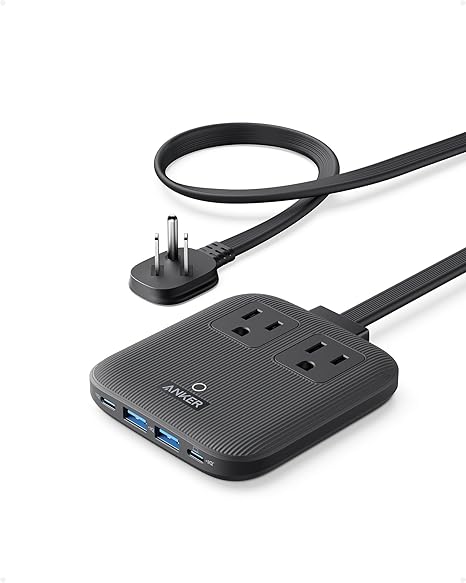
Anker Nano Charging Station(67W Max), 6-in-1 USB-C Power Strip for iPhone 16/15 and MacBook, with Flat Plug and 5ft Thin Undetachable Extension Cord,2 AC,2 USB-A,2 USB-C, for Home&Office
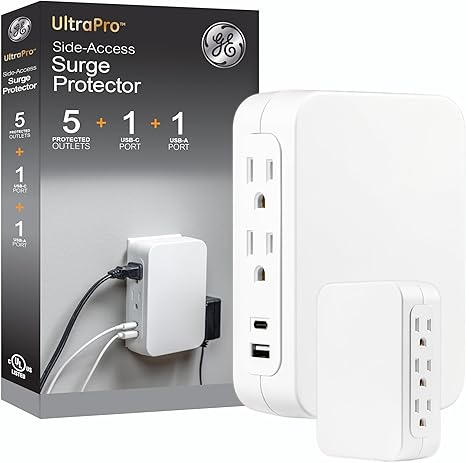
GE USB C 5 Outlet Extender, Side-Access, Wall Tap Surge Protector, Multi-Plug, USB A, 3-Prong, Secure Install, White, 83503
Magnetic, modular, and compact mean different things
A magnetic power strip moves the AC outlet body onto a compatible steel surface. That is not the same as a charger whose magnet only aligns a phone. Genuine modularity is different again. It means outlet or surge modules can be rearranged or replaced. None of these three products has verified reconfigurable modules, so "modular" is not a useful reason to choose among them.
The alternatives solve different placement problems. A flat plug reduces projection at the receptacle while a cord moves the connection point elsewhere. A direct-wall extender eliminates the trailing cord but keeps every connection at the receptacle. Discard magnetic mounting if there is no useful steel surface; discard direct-wall placement if the existing outlet is in the wrong place.
Choose by placement method
| Reader need | First look | Tradeoff |
|---|---|---|
| Move the outlet body onto compatible steel | Magnetic Power Strip with 4 AC and 4 USB Ports; dual magnets, four grounded AC outlets, and a six-foot 14AWG cord with a rotating flat plug | Two USB-C and two USB-A ports share only a listing-stated 5V/3.4A maximum; 1080J surge protection is stated, but body size and magnetic hold are unknown |
| Move the connection point away from a nonmagnetic or behind-furniture outlet | Anker Nano 67W 6-in-1 Charging Station; two AC outlets, a fixed five-foot cord, and a 0.35-inch flat plug | Two USB-C and two USB-A ports, with USB-C stated at up to 67W for compatible devices; no surge protection, and the body still needs a resting place |
| Eliminate a trailing cord at a useful wall receptacle | GE 83503 USB-C 5-Outlet Extender; direct-wall placement with five side-facing grounded AC outlets | One USB-C and one USB-A port share 17W; 560J surge protection and protection-end shutdown are stated, but body dimensions and retention are unknown |
Choose a row by placement method first, then use the product section to check capacity and fit. None of these descriptions proves clearance around a particular cabinet, trim profile, or adapter.
Magnetic Power Strip with 4 AC and 4 USB Ports: move the outlet body onto compatible steel
The Magnetic Power Strip with 4 AC and 4 USB Ports is the primary pick only for a confirmed compatible-steel surface within a safe cord route. It can move receptacles off a counter or floor, but the magnet does not make its six-foot cord disappear.
Dual magnets attach the body to a metal surface, while four corner holes provide a second mounting path. Test the intended surface. Treat magnetic hold through paint or under cable pull as unknown because the listing gives no magnet strength, body dimensions, or weight. If you rent, use the screw holes only with permission and a clear repair agreement.
Four grounded AC outlets give this model two more AC connections than the Anker, and the listing states 1.66-inch spacing intended to reduce interference from bulky plugs. Two USB-C and two USB-A ports are also included, but 5V/3.4A is the only stated USB maximum; there is no supported per-port allocation or laptop-class charging protocol. The reinforced 14AWG cord is six feet long. The flat plug rotates through 360 degrees for different exit directions, but the full cord still needs a safe route.
The listing also states 1080J surge protection, an integrated 15A circuit-breaker switch, ETL listing, and ratings of 15A, 125V, and 1875W. Those figures are limits to verify against the planned equipment, not permission to fill every receptacle. The mounting point is the material drawback. The body's envelope and the magnets' hold on a particular surface remain unknown, while the longest cord here creates the most routing work.
Choose the Anker Nano 67W 6-in-1 Charging Station instead when there is no compatible steel or a known thin body matters more than two additional AC outlets and listing-stated surge protection. For this magnetic unit, test the surface, lay out all six feet of cord, leave room for the widest adapter, and compare the current product label and instructions with the equipment you intend to connect.
Anker Nano 67W 6-in-1 Charging Station: trade mounting for a 0.35-inch flat plug
Map the Anker Nano 67W 6-in-1 Charging Station before purchase because it is the only option here with a measured body. Choose it when wall-gap clearance and a movable connection point matter more than mounting. It still occupies a horizontal surface.
The body measures 3.94 by 3.66 by 0.75 inches and weighs 13.9 ounces. Its 0.35-inch flat plug leads to a fixed five-foot cord. Mark that full rectangle and depth with paper or painter's tape, then trace the non-detachable cord to the outlet with doors and furniture in their normal positions. The thin plug reduces projection at the wall; it does not prove that the cord and its bend will clear a particular furniture gap.
Two AC outlets sit alongside two USB-C and two USB-A ports. The listing states USB-C charging up to 67W for compatible devices and USB-A charging up to 12W, but it does not give a complete allocation for simultaneous use. This model explicitly has no surge protection and offers the fewest AC outlets in the lineup. A high USB-C maximum does not offset either limit.
Choose the Magnetic Power Strip with 4 AC and 4 USB Ports when compatible steel is available and four AC outlets plus listing-stated surge protection matter more than measured thinness. Choose the Anker only if its marked footprint fits, its fixed cord stays out of circulation, two AC connections are enough, and the location does not require surge protection.
GE 83503 USB-C 5-Outlet Extender: eliminate the cord at a well-placed outlet
Start with the wall receptacle for the GE 83503 USB-C 5-Outlet Extender. It must be firm, indoors, and already useful. The extender removes a trailing cord from the plan, but it cannot move power around furniture or toward another work surface.
Five grounded AC outlets face sideways, with one USB-C and one USB-A port on the body. The outlet orientation redirects plugs away from the front of the wall tap, which may help behind furniture, but it does not establish access to the second receptacle or clearance around every adapter. Because the listing gives neither overall dimensions nor a retention mechanism, mark the surrounding adapter envelope and confirm the exact body size before ordering.
The listing states 560J surge protection, automatic shutdown when surge-protection capacity is exceeded, UL safety certification, and indoor ratings of 120VAC, 15A, and 1800W. Its USB ports share 17W, so the evidence does not support laptop-class USB-C charging or 17W from each port at once. Fixed placement is the material compromise. A loose or inconvenient receptacle offers no routing flexibility, and stability under side-pulling cords cannot be assumed.
Check receptacle snugness and clearance for trim, furniture, and the widest adapters before choosing the GE; confirm the current label and instructions, and keep it indoors. Choose the Anker Nano 67W 6-in-1 Charging Station when five feet of relocation and known body dimensions matter more than five AC outlets and surge protection at the wall.
Match the device to the marked location
- Choose the magnetic strip only if the steel-surface test and the full six-foot cord route both pass.
- Choose the Anker only if its measured outline fits, two AC outlets are enough, and the no-surge boundary suits the location.
- Choose the GE only if the receptacle is firm and useful and the wall area can accommodate the unknown body and adapter envelope.
Before connecting equipment, check the setup against NFPA's home electrical guidance. Verify internal overload protection and a nationally recognized testing-laboratory mark on the exact device. Follow its current instructions, and reject cord routes under rugs, across doorways, or where furniture can pinch or damage them. Replace a cracked, damaged, or loose cord rather than repairing it. If a plug does not fit snugly in the receptacle, stop; a renter should involve the property owner and a licensed electrician rather than alter building wiring.
Compare the exact strip or extender rating with the equipment you will connect. UL Solutions advises using electrical ratings rather than receptacle count to decide what can be connected. Verify the current model's certification mark, surge rating, surge-status or shutdown behavior, electrical limits, and manufacturer restrictions. Place the unpowered device at the marked location, fit the widest adapters, and move nearby furniture through its normal range. Buy only if that dry run leaves the outlet, plugs, and walking route clear.
Guides that use these ideas
Micro-Unit Co-Living: Smart Shared Amenities to Boost Comfort & Cut Costs
Explore practical amenity plans for micro-unit co-living, including layout tips, program ideas, tech integration, and cost-saving strategies.
Read more
Micro-Units and Renters: How Policy Shapes Costs, Rights, and Fixes
Learn how micro-unit policies, landlord incentives, and tenant rights shape rents and living conditions, plus reforms to improve affordability and fairness.
Read more
Micro-Living Habits to Cut Energy, Water & Waste in Tiny Homes
Practical steps to cut energy, water, and waste in under-500 sq ft homes. Learn habits, gear, and routines to shrink your footprint and save money today.
Read more
Ergonomic 8x8 Corner Office: Layout, Posture & Cable Hacks
Design a productive 8x8 corner office for tiny homes, studios, or RVs. Learn ergonomic layout, zoning, and clean cable routing for more comfort and focus.
Read more